
User Roles & Permissions
Access control that fits how your teams actually work
Six roles cover the common cases from day one. When your organization does not fit them, build your own — every permission in Gruntify can go in a role you define.
Free for 14 days. No credit card required.
-
Roles you define
Build a role from scratch, or clone one of the six built-in roles and change what you need.
-
Grouped by permission area
Permissions are organized the way the product is — requests, jobs, assets, forms, maps, people.
-
Not gated behind a tier
Custom roles are part of every plan, not an enterprise-only extra you have to negotiate for.
-
Consistent across the workspace
Change a role once and every user who holds it moves with it — web app, mobile apps and API.


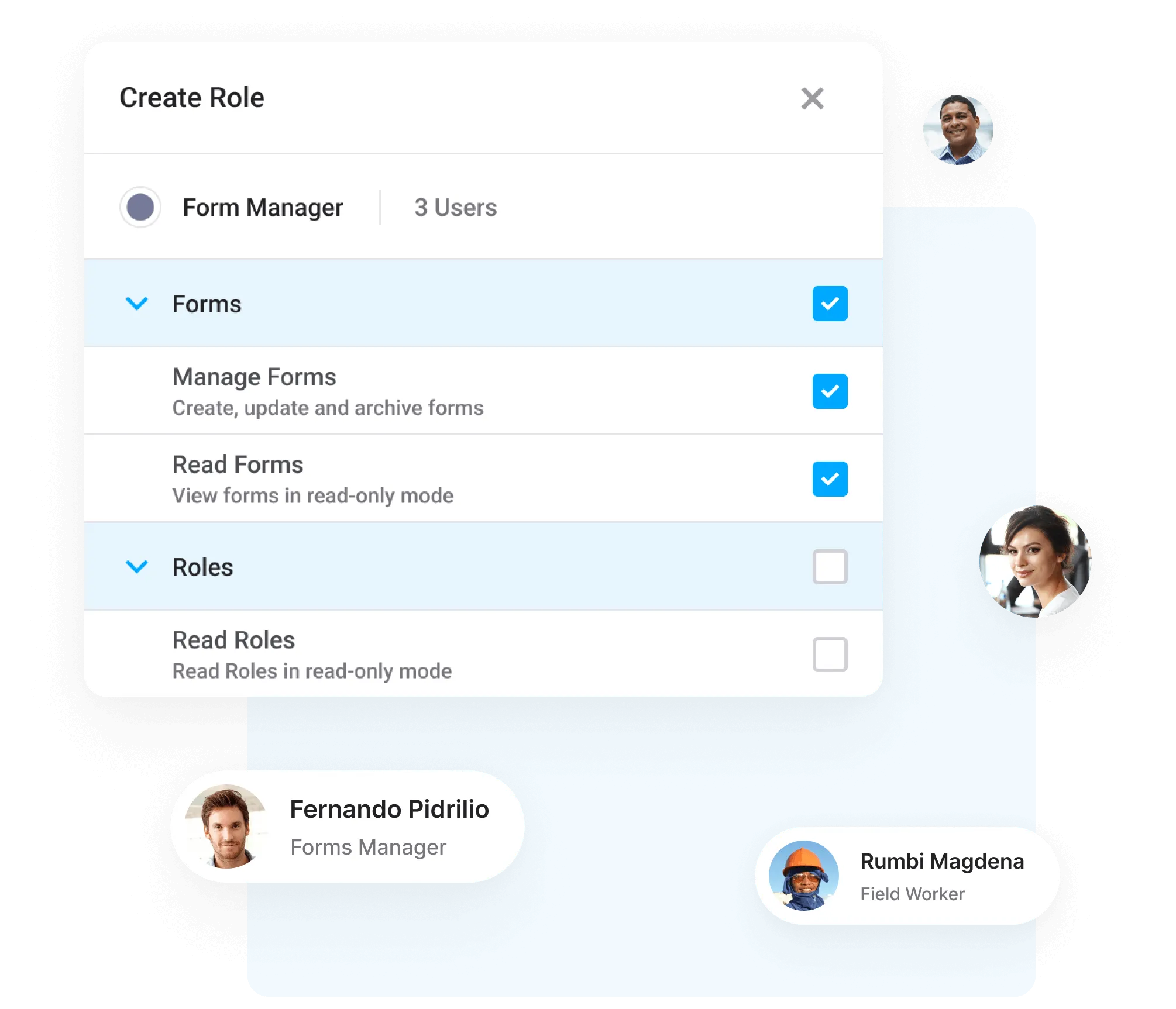
Go beyond the roles that ship with the product
The six built-in roles are a starting point, not a ceiling. In a larger organization the way work divides up is specific to you — so build roles that match it, rather than bending your teams around ours.
- Clone, then change
- Copy a built-in role and adjust it. The originals are protected, so there is nothing to break and nothing to restore.
- One change, everywhere
- Roles are assigned to people, not copied onto them. Edit the role and every holder moves with it — including in the field apps.
Three steps to a role of your own
-
Start from a role
Clone one of the six built-in roles, or start from an empty one. The built-in roles themselves stay exactly as they are.
-
Add and remove permissions
Choose the permission areas the role needs. Prerequisites come along automatically, so you cannot build a role that cannot function.
-
Assign it to people and teams
Give the role to users the same way you give them a built-in one. Change it later and everyone holding it moves with it.
Six roles to start from
Every workspace gets these on day one. They cannot be edited — which is the point: they are a known-good baseline to clone from.
-
Primary Owner
The account that created the workspace. Holds everything, including the permissions no other role and no custom role can be given.
Typically: One person per workspace — usually the person who signed up.
-
Owner
Runs the workspace day to day: people, forms, maps, templates, automations and settings. Not a field role — an Owner cannot complete a job on site.
Typically: System administrators and department managers.
-
Controller
Runs the work rather than the workspace. Triages requests, edits and cancels jobs, and can pick up field work when needed.
Typically: Team leaders and dispatchers.
-
Data Collector
Creates the records — requests, jobs and assets, with the photos and locations that go with them — and submits them for someone else to action. Does not do the follow-up work.
Typically: Inspectors, auditors, reporters and first responders.
-
Worker
A Data Collector who also does the follow-up work: check in to an assigned job, complete it on site, fill in the pre-work and post-work forms, check out.
Typically: Field crews — electricians, plumbers, arborists, road crews.
-
Reporter
Read, export and comment, and nothing else. Full visibility of the work without the ability to change any of it.
Typically: Executives, auditors, and stakeholders outside the delivery team.






What each role can do
A simplified view of what permissions are granted by default.
| Primary Owner | Owner | Controller | Data Collector | Worker | Reporter | Your custom role | |
|---|---|---|---|---|---|---|---|
| Working in the field | |||||||
See work on the mapRequests, jobs and assets on the map, with the layers and basemaps the workspace has set up. | Primary Owner can see work on the map | Owner can see work on the map | Controller can see work on the map | Data Collector can see work on the map | Worker can see work on the map | Reporter can see work on the map | A custom role can be given see work on the map |
Create and update requests, jobs and assetsRaise new records from the field or the office, edit them, and delete them. | Primary Owner can create and update requests, jobs and assets | Owner can create and update requests, jobs and assets | Controller can create and update requests, jobs and assets | Data Collector can create and update requests, jobs and assets | Worker can create and update requests, jobs and assets | Reporter cannot create and update requests, jobs and assets | A custom role can be given create and update requests, jobs and assets |
Complete assigned jobs on siteCheck in and out of a job, move it through its statuses and fill in the pre-work and post-work forms from the mobile app. | Primary Owner can complete assigned jobs on site | Owner cannot complete assigned jobs on site | Controller can complete assigned jobs on site | Data Collector cannot complete assigned jobs on site | Worker can complete assigned jobs on site | Reporter cannot complete assigned jobs on site | A custom role can be given complete assigned jobs on site |
Comment on recordsAdd comments to requests, jobs and assets so context travels with the record. | Primary Owner can comment on records | Owner can comment on records | Controller can comment on records | Data Collector can comment on records | Worker can comment on records | Reporter can comment on records | A custom role can be given comment on records |
| Coordinating the work | |||||||
Accept, reject and resubmit requestsTriage what the field submits before it becomes work. | Primary Owner can accept, reject and resubmit requests | Owner can accept, reject and resubmit requests | Controller can accept, reject and resubmit requests | Data Collector cannot accept, reject and resubmit requests | Worker cannot accept, reject and resubmit requests | Reporter cannot accept, reject and resubmit requests | A custom role can be given accept, reject and resubmit requests |
Edit and cancel jobs outside the fieldChange job details and forms before dispatch and after completion, and cancel jobs that are no longer needed. | Primary Owner can edit and cancel jobs outside the field | Owner can edit and cancel jobs outside the field | Controller can edit and cancel jobs outside the field | Data Collector cannot edit and cancel jobs outside the field | Worker cannot edit and cancel jobs outside the field | Reporter cannot edit and cancel jobs outside the field | A custom role can be given edit and cancel jobs outside the field |
Schedule recurring workCreate, change and remove recurring job schedules. | Primary Owner can schedule recurring work | Owner can schedule recurring work | Controller cannot schedule recurring work | Data Collector cannot schedule recurring work | Worker cannot schedule recurring work | Reporter cannot schedule recurring work | A custom role can be given schedule recurring work |
Force check-out and bulk importRelease a job another user has checked out, archive requests, and bulk import requests, jobs and assets. | Primary Owner can force check-out and bulk import | Owner can force check-out and bulk import | Controller cannot force check-out and bulk import | Data Collector cannot force check-out and bulk import | Worker cannot force check-out and bulk import | Reporter cannot force check-out and bulk import | A custom role can be given force check-out and bulk import |
| Configuring the platform | |||||||
Build and update formsCreate and edit the smart forms behind requests, jobs and assets, and archive the ones no longer in use. | Primary Owner can build and update forms | Owner can build and update forms | Controller cannot build and update forms | Data Collector cannot build and update forms | Worker cannot build and update forms | Reporter cannot build and update forms | A custom role can be given build and update forms |
Configure maps, templates and field resourcesMap layers and basemaps, job and report templates, and the depots, equipment and accreditations work is planned against. | Primary Owner can configure maps, templates and field resources | Owner can configure maps, templates and field resources | Controller cannot configure maps, templates and field resources | Data Collector cannot configure maps, templates and field resources | Worker cannot configure maps, templates and field resources | Reporter cannot configure maps, templates and field resources | A custom role can be given configure maps, templates and field resources |
Build automations in Workflow StudioCreate and change the workflows that move work along automatically. Workflow Studio is an add-on; it is included with Enterprise. | Primary Owner can build automations in workflow studio | Owner can build automations in workflow studio | Controller cannot build automations in workflow studio | Data Collector cannot build automations in workflow studio | Worker cannot build automations in workflow studio | Reporter cannot build automations in workflow studio | A custom role can be given build automations in workflow studio |
Use the Grunt.AI assistantStart and continue AI conversations, including the form and dashboard building agents. Extending to every role during 2026. | Primary Owner can use the grunt.ai assistant | Owner can use the grunt.ai assistant | Controller can use the grunt.ai assistant | Data Collector can use the grunt.ai assistant | Worker can use the grunt.ai assistant | Reporter can use the grunt.ai assistant | A custom role can be given use the grunt.ai assistant |
| Reporting and exports | |||||||
Run reports and dashboardsThe standard reports and dashboards every workspace gets. | Primary Owner can run reports and dashboards | Owner can run reports and dashboards | Controller can run reports and dashboards | Data Collector can run reports and dashboards | Worker can run reports and dashboards | Reporter can run reports and dashboards | A custom role can be given run reports and dashboards |
Export recordsExport requests, jobs and assets as PDF, CSV or GeoJSON. | Primary Owner can export records | Owner can export records | Controller can export records | Data Collector can export records | Worker can export records | Reporter can export records | A custom role can be given export records |
Share dashboards and saved filtersPublish a dashboard or a saved filter to the rest of the workspace rather than keeping it to yourself. | Primary Owner can share dashboards and saved filters | Owner can share dashboards and saved filters | Controller cannot share dashboards and saved filters | Data Collector cannot share dashboards and saved filters | Worker cannot share dashboards and saved filters | Reporter cannot share dashboards and saved filters | A custom role can be given share dashboards and saved filters |
Access system reportsThe workspace-wide reports on usage and activity, as opposed to the standard operational ones. | Primary Owner can access system reports | Owner can access system reports | Controller cannot access system reports | Data Collector cannot access system reports | Worker cannot access system reports | Reporter cannot access system reports | A custom role can be given access system reports |
| People and access | |||||||
See who is in the workspaceView the user and team directory. | Primary Owner can see who is in the workspace | Owner can see who is in the workspace | Controller can see who is in the workspace | Data Collector cannot see who is in the workspace | Worker cannot see who is in the workspace | Reporter cannot see who is in the workspace | A custom role can be given see who is in the workspace |
Add, edit and remove users and teamsInvite people, change their details, move them between teams, and remove them. | Primary Owner can add, edit and remove users and teams | Owner can add, edit and remove users and teams | Controller cannot add, edit and remove users and teams | Data Collector cannot add, edit and remove users and teams | Worker cannot add, edit and remove users and teams | Reporter cannot add, edit and remove users and teams | A custom role can be given add, edit and remove users and teams |
Create and edit custom rolesBuild a role from the permission areas above and assign it. Only the Primary Owner holds this by default — but it can be granted to a custom role. | Primary Owner can create and edit custom roles | Owner cannot create and edit custom roles | Controller cannot create and edit custom roles | Data Collector cannot create and edit custom roles | Worker cannot create and edit custom roles | Reporter cannot create and edit custom roles | A custom role can be given create and edit custom roles |
| Workspace administration | |||||||
Change workspace and general settingsWorkspace name, appearance, regions and the rest of the general settings. | Primary Owner can change workspace and general settings | Owner can change workspace and general settings | Controller cannot change workspace and general settings | Data Collector cannot change workspace and general settings | Worker cannot change workspace and general settings | Reporter cannot change workspace and general settings | A custom role can be given change workspace and general settings |
Read the workspace audit logThe record of who changed what, across the workspace. | Primary Owner can read the workspace audit log | Owner can read the workspace audit log | Controller can read the workspace audit log | Data Collector cannot read the workspace audit log | Worker cannot read the workspace audit log | Reporter cannot read the workspace audit log | A custom role can be given read the workspace audit log |
Bypass form field permissionsSee and edit form fields that are restricted for everyone else, in the web app and over OData. | Primary Owner can bypass form field permissions | Owner can bypass form field permissions | Controller cannot bypass form field permissions | Data Collector cannot bypass form field permissions | Worker cannot bypass form field permissions | Reporter cannot bypass form field permissions | A custom role can be given bypass form field permissions |
Delete the workspaceReserved to the Primary Owner. This one cannot be granted to a custom role. | Primary Owner can delete the workspace | Owner cannot delete the workspace | Controller cannot delete the workspace | Data Collector cannot delete the workspace | Worker cannot delete the workspace | Reporter cannot delete the workspace | Reserved — a custom role cannot delete the workspace |
The complete list of permissions is in the role editor and in the help centre .
Set access up the way your organization works
Try free for 14 days. No credit card required.
Customer support is our highest priority
We’re here to answer all your questions via our Help Center and Support Tickets.
 Help Centre
 Support Ticket